

Updated September 30, 2026: We checked current features, pricing and access terms against official sources. The firsthand impressions below come from the author’s original tests.
Natulang gives you more help than a blank chatbot and more freedom than a fixed phrasebook. That makes it appealing if you already know some Spanish, French, or another supported language and need a reason to start talking.
How I reviewed Natulang
I tested Natulang in Spanish on an iPhone. I completed the placement test, tried a guided speaking lesson, created a custom conversation about renting a flat in Madrid, saved a phrase, and opened the repetition lesson.
This focused session covered placement, the core speaking exercise, custom dialogue, and review. Free Dialogs made useful practice quickly, but the lesson list did not show me a clear next step.
For this update, we checked Natulang’s website, its US Apple App Store listing, its Google Play listing, release notes, and learner discussions. The review weighs speaking practice, guidance, voice quality, repetition, and value.
💬 Had to take a FIDE test here in Switzerland to renew my resident permit and passed B1 oral A1 written with 92 and 95 percent pass rates. No way would have achieved that without this course.
Chris Horler, Copycat Cafe user, Switzerland
Do you understand the lesson, then freeze when it is your turn to answer? Copycat Cafe helps you rebuild real lines from audio, say them aloud, and use them in a low-pressure conversation.
What is Natulang?
Natulang is a speaking-focused language app for iPhone, iPad, Android, and supported Apple-silicon Macs. Instead of building most lessons around multiple-choice questions, it asks you to listen and respond aloud in everyday dialogues. The company describes the experience as personalized and hands-free.
Two parts stood out in my test. The lesson library gives you guided dialogue and translation exercises. Free Dialogs lets you ask for a situation you actually care about, such as viewing a flat, preparing for a job interview, or talking to a doctor.
Natulang's team says the regular course lessons are created and reviewed by linguists rather than generated by AI. Free Dialogs are where the app explicitly generates AI conversations.
You also get flashcards and repetition lessons, so useful phrases do not disappear as soon as a conversation ends.
| At a glance | Natulang | What that means for you |
|---|---|---|
| Main focus | Spoken dialogue | You answer aloud from the beginning |
| Custom practice | AI-generated Free Dialogs | Practice situations that matter to you |
| Review | Flashcards and repetition lessons | Bring saved phrases back later |
| Free access | Some lessons are free | Enough to test the basic experience before paying |
| Platforms | iPhone, iPad, Android, and supported Apple-silicon Macs | Check compatibility with your device |
The placement test is useful, but the lesson list needs a clearer route
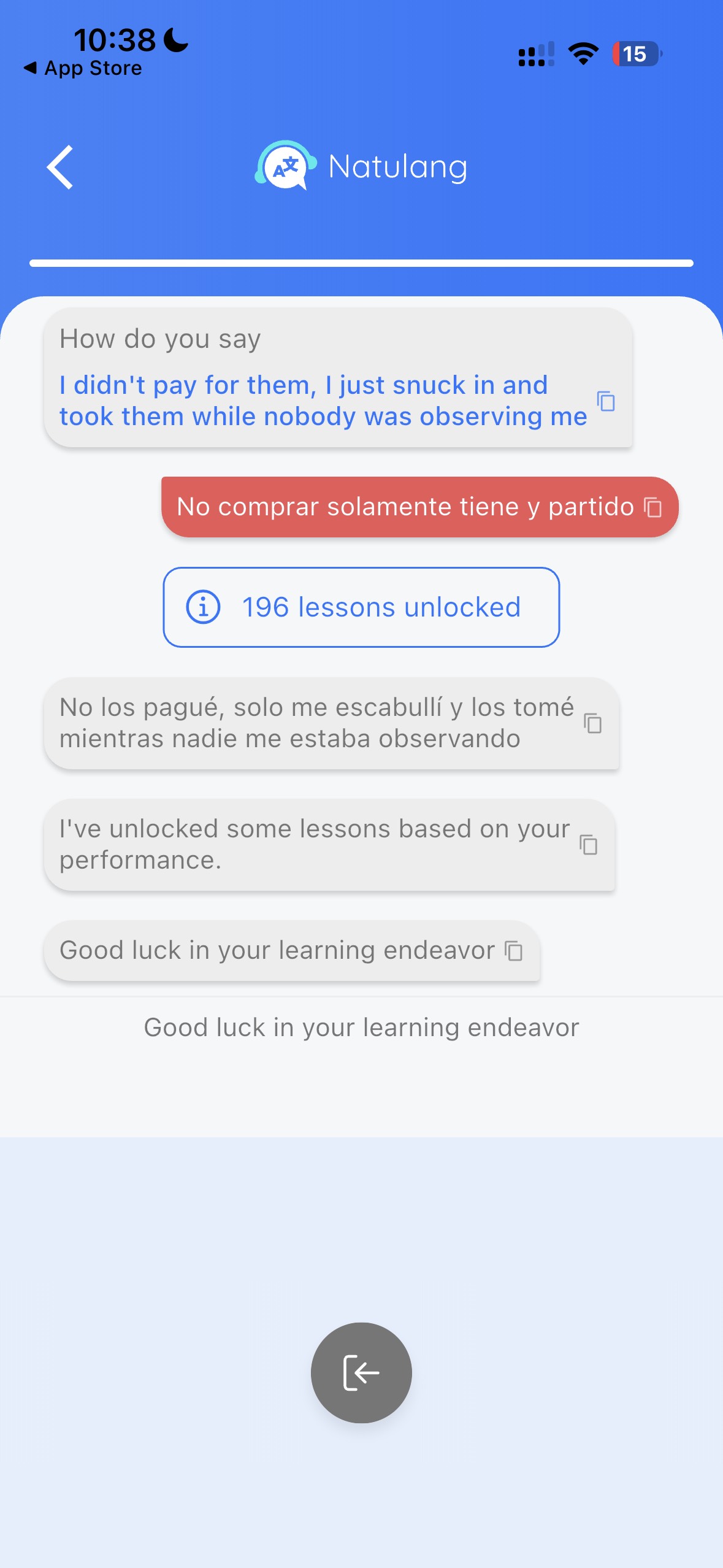
Natulang's placement test asked me to translate English sentences into Spanish aloud. The app compared what it heard with the expected answer, showed a correction when they differed, and adjusted the available lessons.
For a speaking app, the test makes sense. You have to think of the Spanish yourself and say it aloud, rather than choose from answers already on the screen.
My result unlocked 196 lessons. That sounds generous, but it created the first real problem: the lesson screen did not make the next move obvious.
Several lessons were open, several were locked, and the list mixed numbered lessons with summaries and story groups. I could pick something, but I could not immediately tell which lesson Natulang recommended for my level.
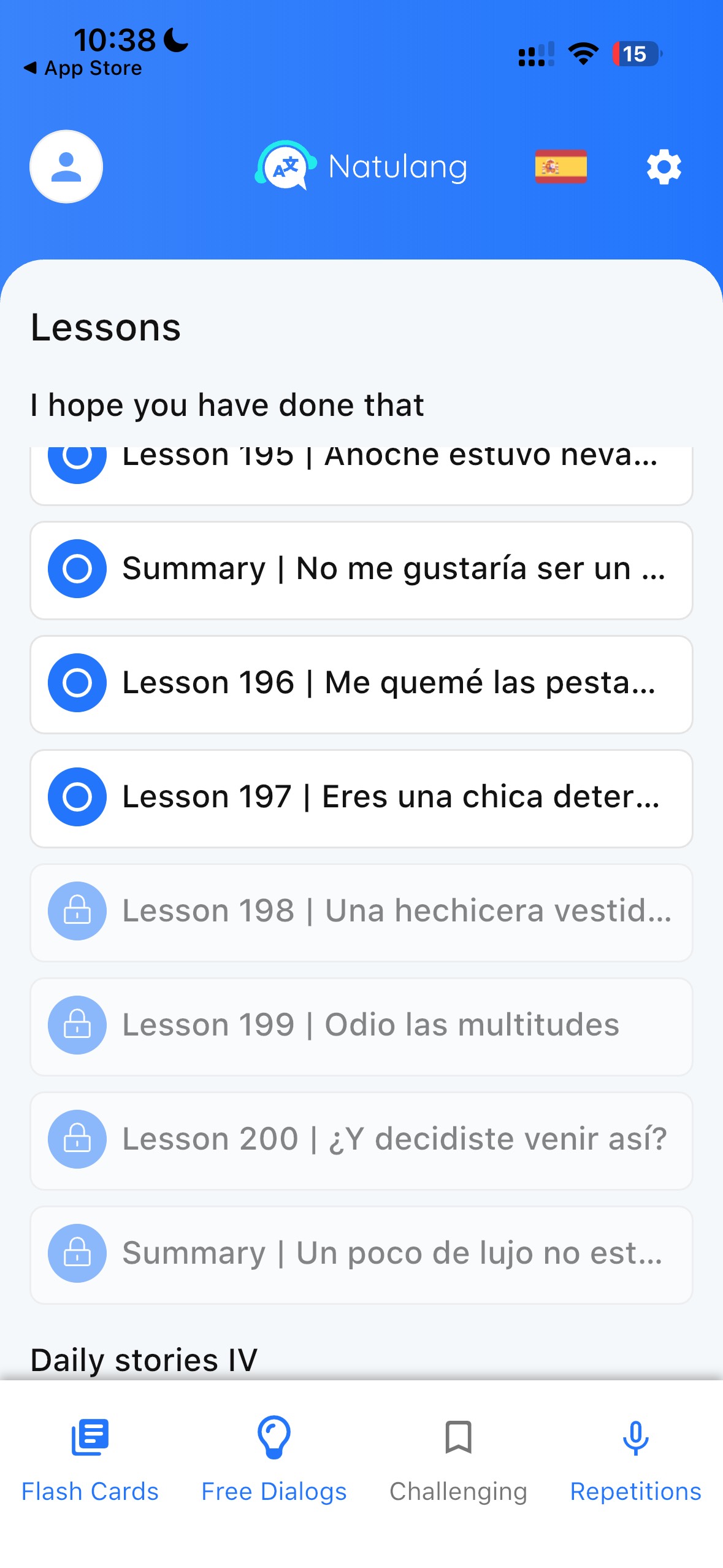
A placement test should remove choice. Natulang gave me a level, then handed the choice back to me.
What a Natulang speaking lesson feels like
In the guided lesson I tried, Natulang presented an English line and asked me to say it in Spanish. It then showed the target answer and the words it recognized from my speech.
This gives the exercise a useful rhythm: hear the prompt, build the sentence, speak, compare, continue. You are not just shadowing audio. You have to retrieve the line yourself.
I liked being able to choose a speech-recognition engine in the settings. If one engine has trouble with your accent or a noisy room, another may work better. I did not compare the engines closely enough to name a winner, but having the choice is welcome.
The audio was clear and the Spanish pronunciation sounded good overall. Some voices still had the slightly flat, robotic quality you hear in generated audio. It did not make the lesson unusable, but it was noticeable.
Free Dialogs is Natulang's best feature
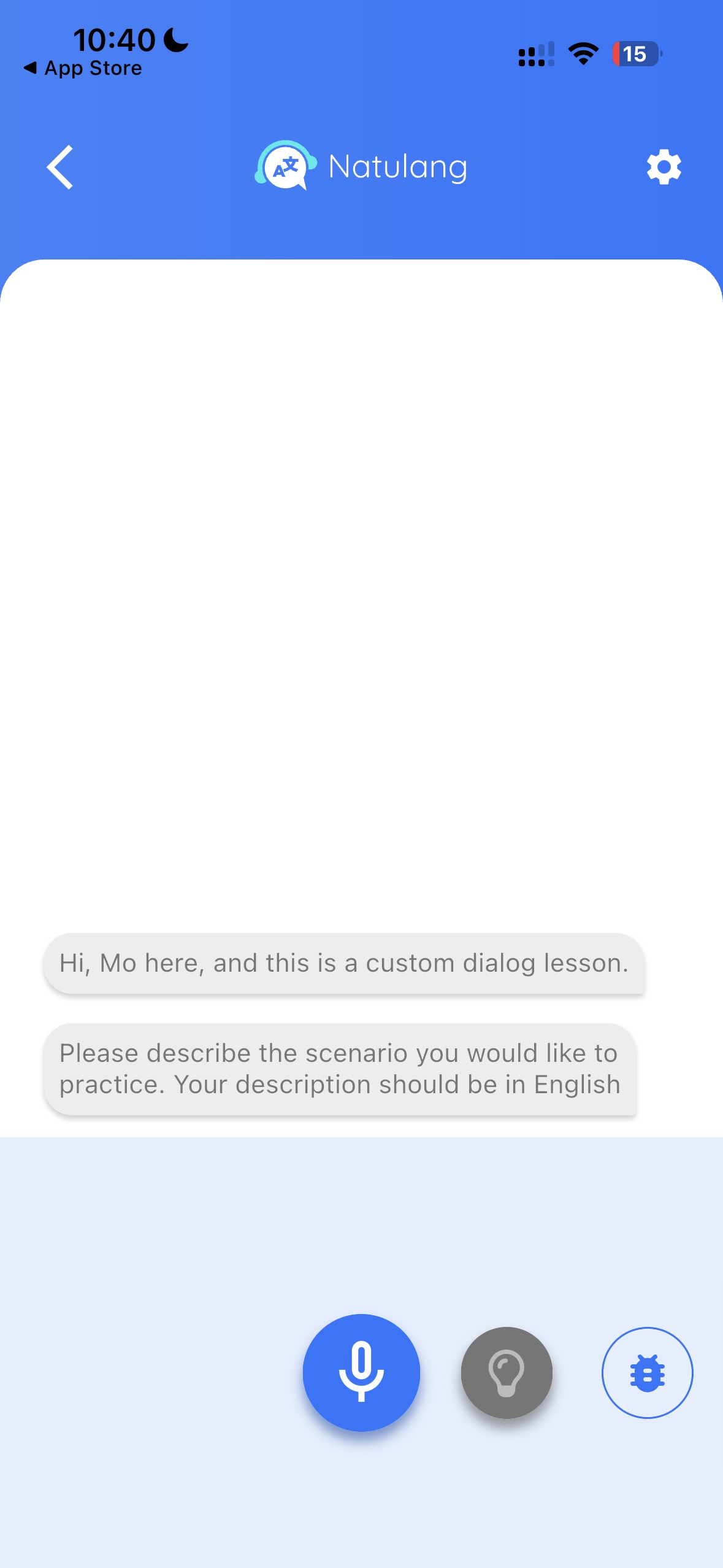
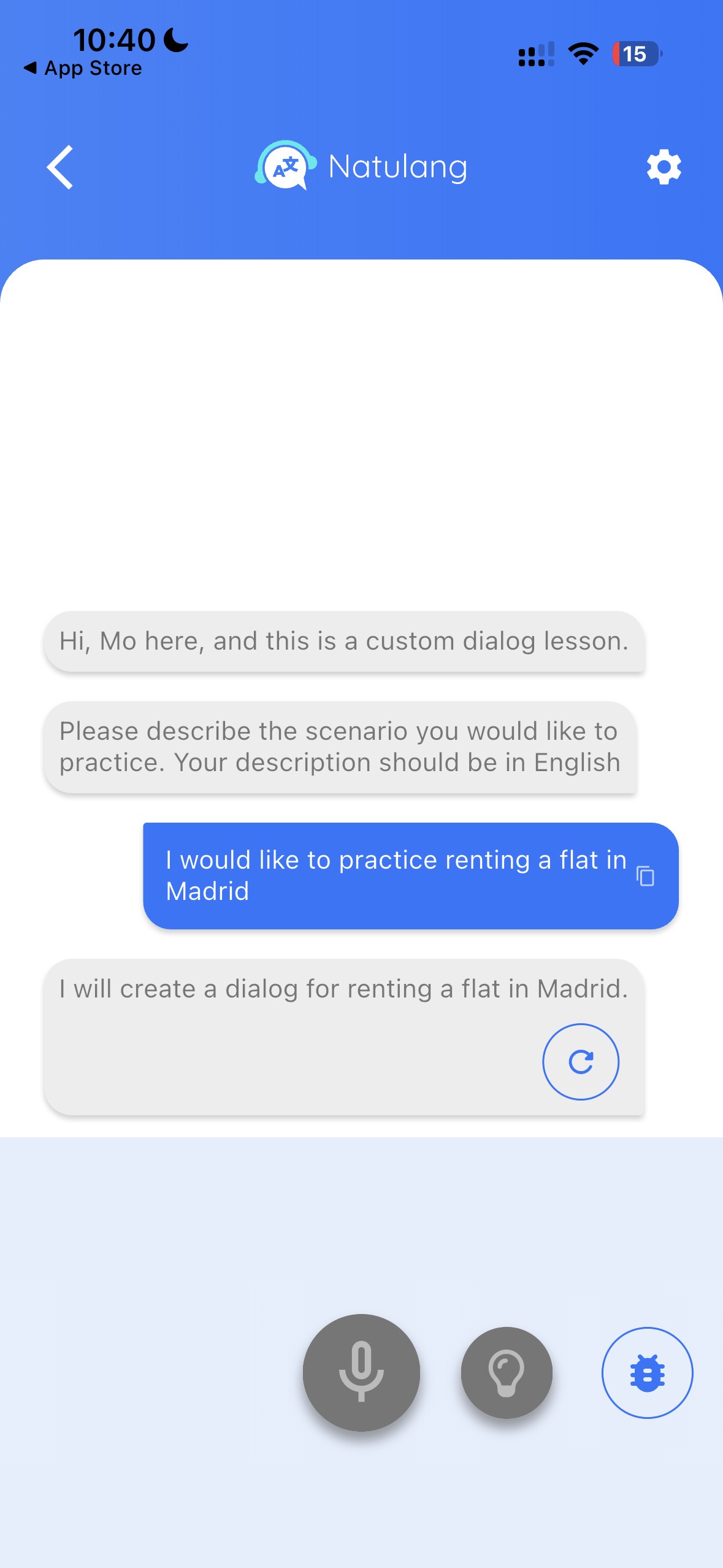
Free Dialogs begins with a simple question: what situation do you want to practice? You describe it in English, and Natulang creates a conversation around that request.
I asked to practice renting a flat in Madrid. Natulang built a Spanish viewing scenario with a furnished two-bedroom apartment priced at €1,200 a month. That was much more useful than being dropped into a generic chat and told to start talking.
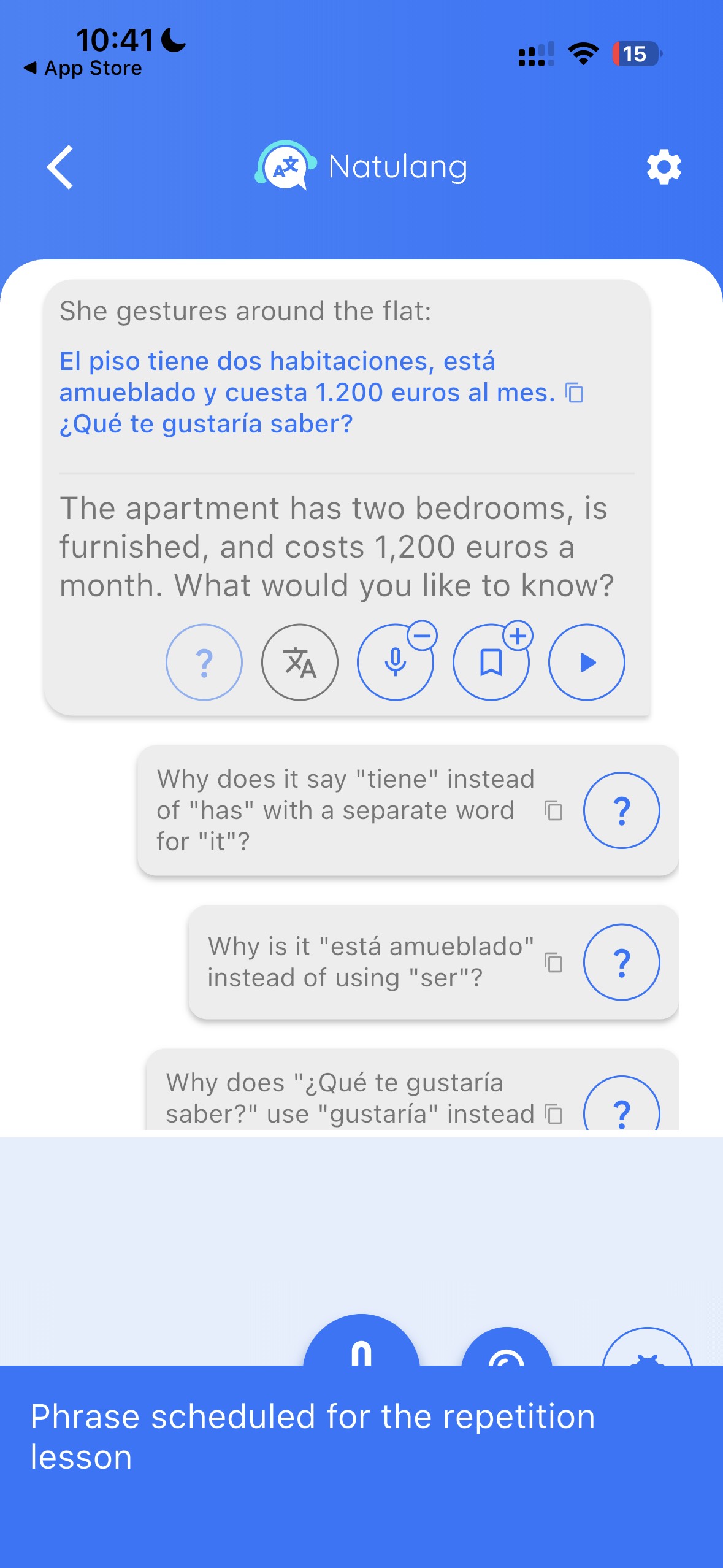
The conversation screen in my test included audio, a translation, suggested grammar questions, and a bookmark control. I could ask why the line used tiene, why it said está amueblado, or why the question used gustaría. Those prompts are helpful when you can understand the sentence but cannot explain the choice of words.
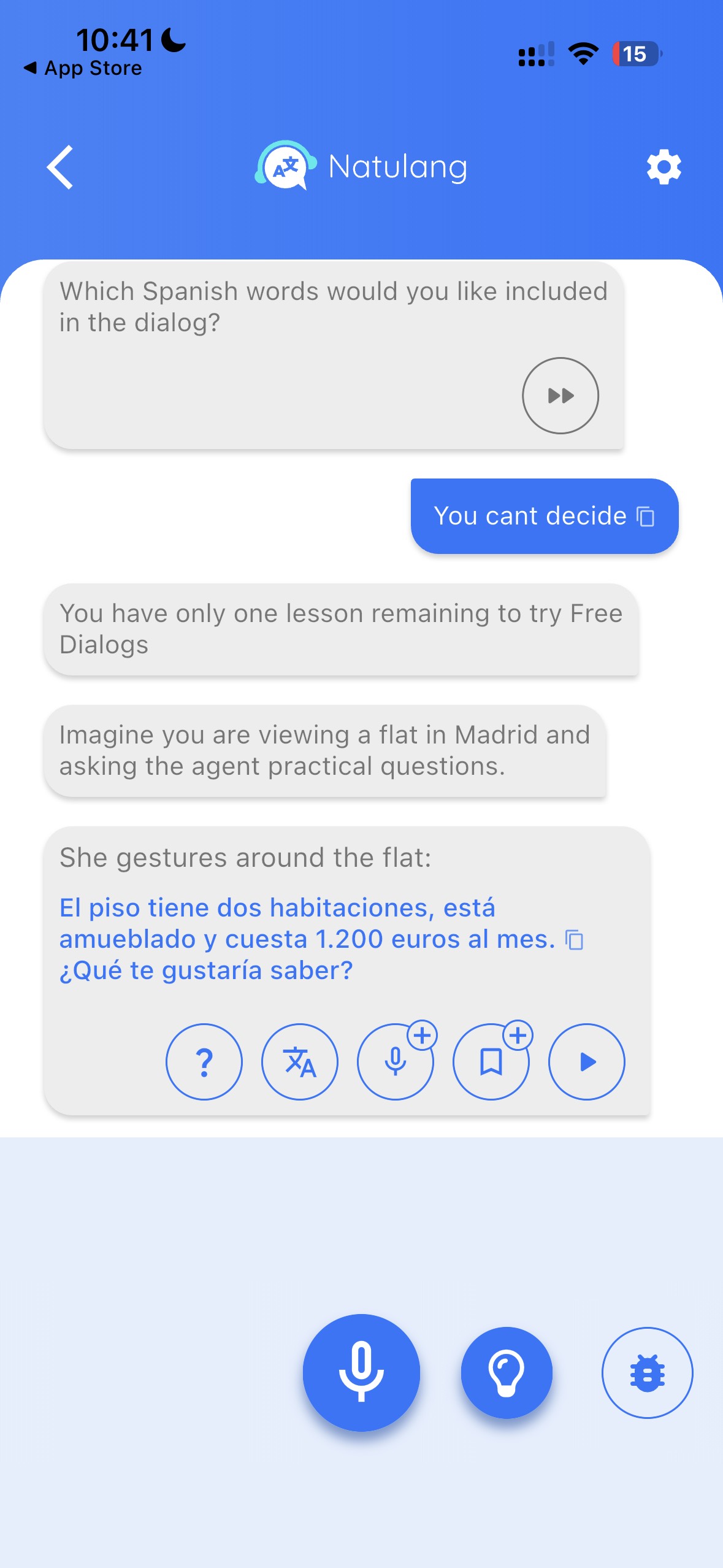
I could also ask Natulang to include particular words in the dialogue. I could take vocabulary from work, travel, or an upcoming appointment and rehearse it inside a plausible exchange.
The part Natulang gets right
AI chat is easier when the app gives you a scene, a first line, audio, translation, and questions you can ask. Natulang does not make you invent the whole lesson yourself.
Saved phrases return in repetition lessons
Tap the bookmark beside a useful line and Natulang schedules it for repetition. I saved a phrase from the Madrid flat conversation, then found it waiting in a separate repetition lesson.
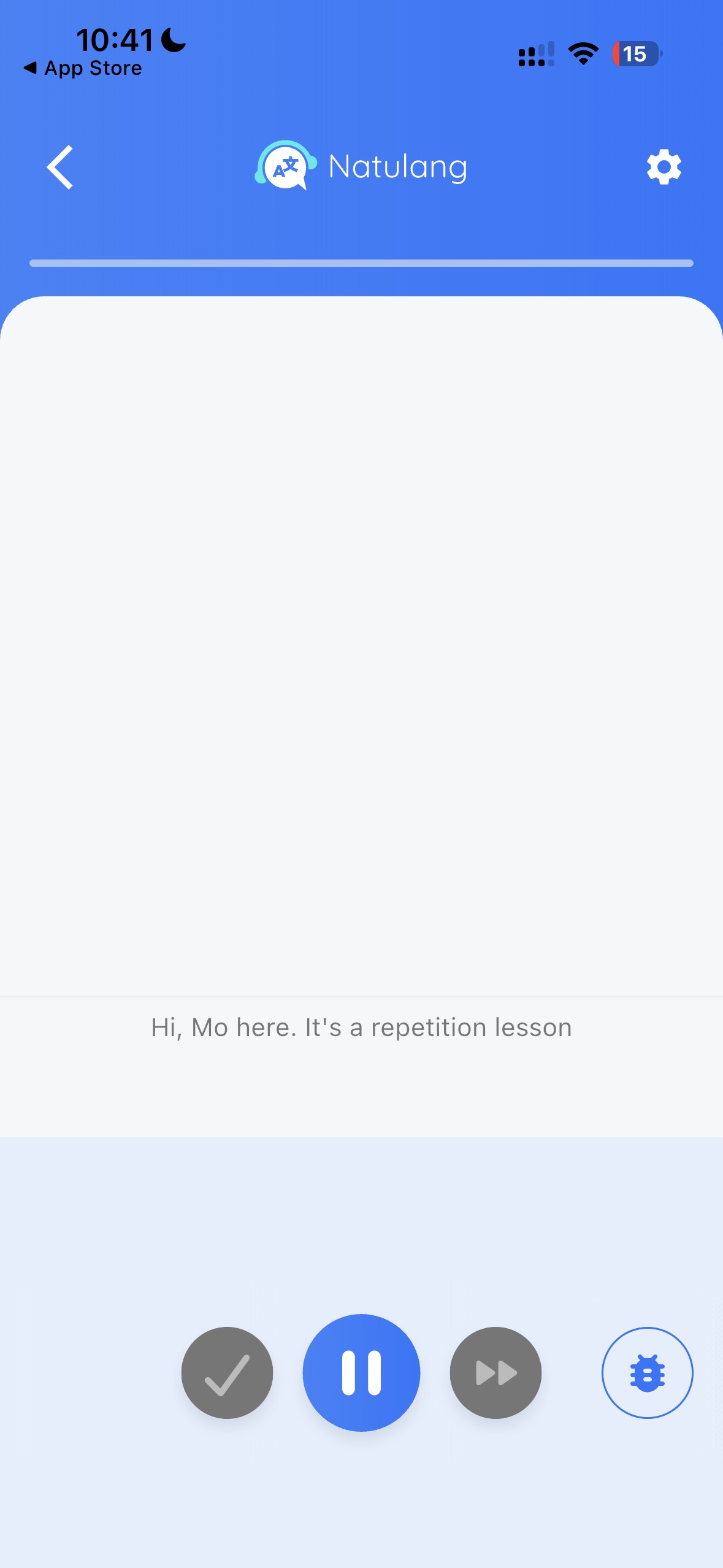
I liked that the bookmark had a clear purpose. The sentence from my Madrid conversation appeared again in a repetition lesson, so saving it led straight to another chance to say it.
The main navigation in my test included Flash Cards, Free Dialogs, Challenging, and Repetitions. I understood Flash Cards and Repetitions immediately. “Challenging” was less clear because I did not open that section during this test.
What Natulang does well
It makes you answer aloud
The core task is producing a sentence, not spotting one in a list.
Custom scenes have a purpose
You can rehearse a flat viewing, appointment, interview, or another real situation.
Help stays close to the line
Translation, audio, and suggested grammar questions are available without leaving the dialogue.
Useful phrases come back
Bookmarks feed repetition instead of becoming a forgotten saved list.
Natulang's store listings also describe a hands-free mode, and Apple's listing says the app supports VoiceOver. I did not do an accessibility test, so those are features to confirm on your own device if they matter to you.
What Natulang could improve
A clearer next lesson
The biggest weakness appeared immediately after placement. Unlocking a large lesson library feels generous, but the screen needs a strong “start here” signal. A recommended next lesson would make the result feel personal instead of overwhelming.
More natural voices
The Spanish audio was understandable and generally well pronounced. It occasionally sounded generated rather than conversational. If natural rhythm and emotion are your top priority, listen carefully during the free lessons before buying.
Natulang’s September release notes now describe more lesson voices that alternate by default. That is a welcome update to compare with the voices I heard.
Speech recognition that explains its judgment
Natulang showed me what it heard and the target answer, which helped me see where my response differed. I did not use the speech recognition long enough to judge how consistent it is across accents, devices, or noisy rooms.
In a Natulang subreddit discussion, one learner said an equivalent phrase was rejected, while another reported that alternative wording worked. The team said linguists check accepted answers and invited specific examples of missing equivalents.
The latest release notes report broader acceptance of alternative correct answers. Apple’s September history also mentions improved matching of unfinished phrases. These changes address the kinds of issues raised, but your own accent and answers are still worth trying in the free lessons.
More confidence around lifetime access
Natulang's lifetime plans are attractive beside an ongoing subscription. In the announcement for the all-language plan, the founder described it as one payment for permanent access to current and future courses. A one-time purchase still carries the normal risk that any app may change or stop operating.
I am not saying Natulang is in trouble. I would judge the plan by how much use I expect to get from it, not treat “lifetime” as a guarantee that the app will exist forever.
How much does Natulang cost?
Natulang offers some free lessons. Full access requires a paid purchase.
On September 30, 2026, the US Apple App Store listing showed these in-app purchases in US dollars:
- Premium: $9.99
- One-language lifetime options shown by Apple: $119.99
- Lifetime access for all languages: $199.99
Apple labels the $9.99 option “Premium” without a billing period in its public price list. Check that period and the renewal terms on the purchase screen. Prices shown may vary by country, platform, and offer.
Apple says subscriptions renew automatically unless auto-renewal is switched off at least 24 hours before the current period ends. Lifetime purchases are separate one-time offers.
Which plan makes sense? Start free. If you still use Natulang after the first burst of curiosity, compare the exact subscription terms on your device with the lifetime price. In Apple’s US listing, the all-language lifetime option costs $80 more than the one-language options shown. It is only the better deal if you genuinely expect to use another course.
What languages does Natulang offer?
Natulang’s Apple and Google Play descriptions list these languages:
- Spanish
- French
- German
- Italian
- Brazilian Portuguese
- Dutch
- Turkish
- Ukrainian
- Polish
- Czech
- English
September release notes also mention Japanese practice and reading aids. Check the in-app course selector for its current availability and lesson coverage.
What are learners saying about Natulang?
My own experience explains some of the positive feedback. Free Dialogs gave me a useful situation quickly, and Natulang kept asking me to answer aloud. My reservations were the crowded lesson screen and voices that sometimes sounded slightly robotic.
On September 30, 2026, Natulang showed 4.8 out of 5 from 417 ratings in the US Apple App Store and 4.5 out of 5 with over 400 reviews on Google Play.
The public comments that matched my experience were specific. An Apple reviewer described making vocabulary from other programs usable. In a September review, Google Play user John Smith praised Natulang as a supplement and said an earlier audio-sync issue had improved. In a Natulang subreddit discussion, the founder recommended combining the app with a tutor or speaking club and YouTube for comprehension.
Learners disagreed about whether valid alternative answers were accepted. The subreddit is dedicated to Natulang and team members reply there, so I used it for specific examples rather than as a measure of overall satisfaction. These self-selected reviews do not tell us how common an issue is.
Natulang vs Copycat Cafe
Natulang and Copycat Cafe both make speaking the task, but they help you get there in different ways.
Natulang is strong when you want to create a specific situation quickly. It often starts with an English prompt and asks you to say the translation. Free Dialogs can build a new scene around your request, which worked well when I wanted to rehearse viewing a flat in Madrid.
Copycat Cafe gives you more structure before the conversation starts. You begin with a complete conversation and follow the recommended Watch, Copy, and Chat route. In Watch, you listen at normal or slow speed and rebuild each line. In Copy, you say useful chunks aloud and get focused pronunciation feedback for the next take. In Chat, you use what you copied with Copy, your AI conversation partner.
Natulang’s custom scenarios were a highlight of my test. Copycat Cafe’s recommended route gives you a model to hear, helps you rebuild and say its useful parts, then asks you to use them in conversation. You can also open Chat directly. If you understand more than you can say, Copycat Cafe may be the better fit because it gives you a clear next step instead of asking you to choose from a crowded lesson list.
| Feature | Natulang | Copycat Cafe |
|---|---|---|
| Core speaking task | Translate prompts and answer inside dialogues | Rebuild lines, copy useful chunks, then use them in conversation |
| Custom conversation | Creates a Free Dialog from your English scenario | Chat with Copy for open practice and lesson roleplay |
| Pronunciation help | Shows recognized speech and the target answer | 0 to 100 pronunciation score and focused feedback on recordings it can assess |
| Review | Flashcards and repetition lessons from saved phrases | Review keeps copied phrases ready to say |
| Languages | Spanish, French, German and more; see the language section for the full store list and Japanese update | French, Spanish (Latin America), Spanish (Spain), Italian, and German |
| Platforms | iPhone, iPad, Android, and supported Apple-silicon Macs | Web app on desktop and mobile browsers |
| Free start | Some lessons are free | 7-day free trial; card required; renews unless cancelled |
| Best fit | You want mobile dialogue practice in a wider choice of languages | You understand more than you can say and want a structured path from listening to conversation |
| Course structure | Guided lessons, custom dialogues, and repetition | 200 structured lessons per course; recommended Watch → Copy → Chat route |
| Price | US Apple listing: $9.99 Premium (billing period not shown); $119.99 for listed one-language lifetime offers; $199.99 all-language offer | US$174/year or US$29/month, Personal plan |
Copycat Cafe includes all five courses. Its 30-day money-back guarantee applies to the first payment. Prices shown may vary by country, platform, and offer.
Choose Natulang if...
- You want a native iOS or Android app.
- You want to generate a dialogue for a very specific real-life situation.
- You need Dutch, Turkish, Ukrainian, Polish, Czech, Brazilian Portuguese, or English.
- You prefer a one-time purchase and accept the usual lifetime-software risk.
Choose Copycat Cafe if...
- You understand more than you can comfortably say.
- You want a recommended path from listening, to copying, to using the language yourself.
- You want focused pronunciation feedback after saying useful chunks aloud.
- You are learning French, Spanish, Italian, or German and want every available course in one subscription.
My honest recommendation: Natulang is the better fit for learners who want a mobile speaking app, broader language choice, and quick custom scenarios. Copycat Cafe is the better fit when your real problem is that you understand the language but the words do not come out. Its structure gives you something useful to copy before asking you to hold a conversation.
💬 Before, I would never have tried speaking even though I knew what to say. This course has given me more confidence in my pronunciation and usage. I really only had about 7 weeks and already felt more confident speaking.
Rebecca Spears, Copycat Cafe user, United States
You do not need another empty chat box. Start with a real conversation. Rebuild it from what you hear, copy the useful lines, then use them with Copy.
Is Natulang worth it?
Yes, for the right learner. Natulang is a thoughtful speaking app with one genuinely useful idea: let learners create the dialogue they need, then bring its best phrases back for review.
It is especially appealing if you already understand some of the language and want daily pressure to produce complete sentences. The free lessons make it easy to find out whether its recognition and voices work well for you.
I would not buy the lifetime plan on the first day. Try the free material, create a situation you actually need, and see whether you return without forcing yourself. If you do, Natulang's lifetime pricing becomes much easier to judge.
If the busy lesson list leaves you unsure where to begin, or if you want a clearer route from listening to speaking, Copycat Cafe is the stronger alternative. The Copycat Method recommends Watch, Copy, and Chat, while still letting you revisit each activity whenever you want.
For more options, see Copycat Cafe's guide to the best AI language learning apps.
Frequently Asked Questions
Is Natulang worth it?
Natulang is worth trying if you want structured speaking practice and custom conversations for real situations. Its strongest feature in my test was Free Dialogs. Try the free lessons before paying, especially if voice quality and speech recognition matter to you.
How much does Natulang cost?
On September 30, 2026, the US Apple App Store listed Premium at $9.99 without showing its billing period, one-language lifetime options at $119.99, and the all-language offer at $199.99. Check the billing period and renewal terms before buying. Prices shown may vary by country, platform, and offer.
Is Natulang free?
Natulang offers some lessons for free. Full access requires a paid purchase. Try the free material to see whether the voices, recognition, and lesson format suit you.
What languages does Natulang offer?
Its store descriptions list Spanish, French, German, Italian, Brazilian Portuguese, Dutch, Turkish, Ukrainian, Polish, Czech, and English. September release notes also mention Japanese. Check the app for current Japanese availability and lesson coverage.
Is Natulang available on Android and iPhone?
Yes. Natulang is listed for Android, iPhone, and iPad. Apple lists iOS and iPadOS 17.6 or later, and macOS 14.6 or later on a Mac with an M1 chip or newer.
Does Natulang use AI?
Yes. Free Dialogs generates conversations, and Natulang uses voice generation and speech recognition. The team says linguists create and review regular course lessons; it also says AI can help generate alternative answers that are checked.
Does Natulang have a lifetime plan?
Yes. The US Apple listing shows one-language lifetime options at $119.99 and an all-language offer at $199.99. The founder describes the latter as a one-time purchase covering current and future courses. Judge its value by the use you expect to get from it.
Can Natulang make you fluent?
No app can guarantee fluency. Natulang can give you speaking, dialogue, and repetition practice. Combine it with varied listening, reading, real conversations, and feedback from other sources.