

Disclosure: I’m Nur Baysal, co-founder of Copycat Cafe, an independent language app focused on speaking practice. Speak did not sponsor, pay for, or review this article. I test competing apps directly because language learners deserve honest, evidence-based comparisons.
Speaking a foreign language out loud is one of the hardest parts of language learning. Many adults can understand a restaurant menu, pass vocabulary quizzes, or recognize hundreds of words on a page. Yet when someone asks a simple question in real life, their mind goes completely blank.
Speak, developed by Speakeasy Labs, Inc., is built around helping learners speak from day one. The company claims more than 15 million downloads, and the app has a 4.8-star rating on the US App Store. In the core lesson flow I tested, Speak asked me to talk throughout the lesson.
How I reviewed Speak
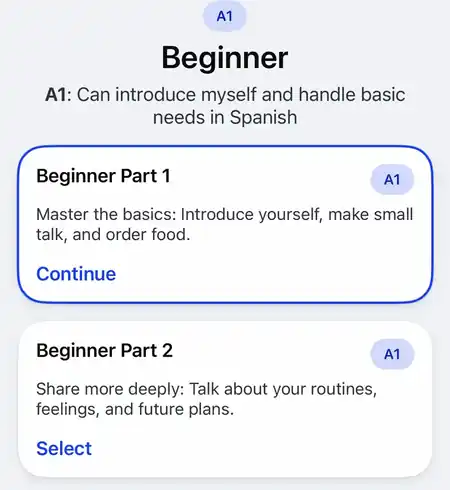
I recorded a hands-on iPhone test with English as the interface language and Spanish as the target language. I explored the course levels, worked through a beginner Tutor Lesson and Speaking Drill, and entered a Guided Conversation. I also checked how well the microphone picked up my voice and whether the transcript was accurate. Then I tried the audio comparison and stopped speaking midway through an attempt to see what happened.
I separately checked Speak’s pricing, plan limits, language availability, App Store listing, and Help Center documentation.
Who Speak is best for
Beginners who freeze in conversation, prefer guided speaking drills, and want to practise everyday travel situations on their phone.
Who should look elsewhere
Learners who need a free app, or who would find the basic feedback and crowded café roleplay I experienced frustrating.
| Feature or spec | Speak app details |
|---|---|
| Developer | Speakeasy Labs, Inc. |
| Tested setup | iPhone, English interface, Spanish course |
| Current iPhone listing | App version 4.66.0; requires iOS 16.0 or later |
| US App Store rating | 4.8 out of 5 stars across approximately 61,000 ratings (Apple App Store listing) |
| Languages for English speakers | Spanish, French, Japanese, Korean, Italian, Simplified Chinese (Speak Help Center) |
| English courses | Available with 15 supported native-language settings, including Spanish, French, German, Italian, Korean, and Japanese |
| Free trial | 7 days for the plan you choose. Payment details are required, and Speak says you must cancel at least 24 hours before the trial ends. |
| Free version | No permanent free learning plan advertised; the trial renews into the selected paid subscription unless canceled at least 24 hours before it ends |
| US subscription pricing | Premium: $17.99 monthly or $83.99 yearly. Premium Plus: $39.99 monthly or $164.99 yearly (US App Store listing) |
| Tested lesson sequence | Tutor Lesson → Speaking Drill → Guided Conversation in the Spanish beginner sequence I recorded |
| Strongest feature observed | Tutor Lessons explain the situation, play example audio, and let you practise phrases before the conversation |
| Biggest tested concern | Basic pronunciation feedback in Spanish, missed attempts even when I spoke clearly, and a confusing roleplay with several characters |
How Speak worked in my test: the lesson sequence
Speak now describes its overall method as Learn → Practice → Apply. In the Spanish course path I recorded, the beginner sequence moved through three connected activities: a Tutor Lesson, a Speaking Drill, and a Guided Conversation. The course was divided into units such as Starting a Conversation, Talking About Yourself, Ordering Food, and Getting Around.
1. The Tutor Lesson
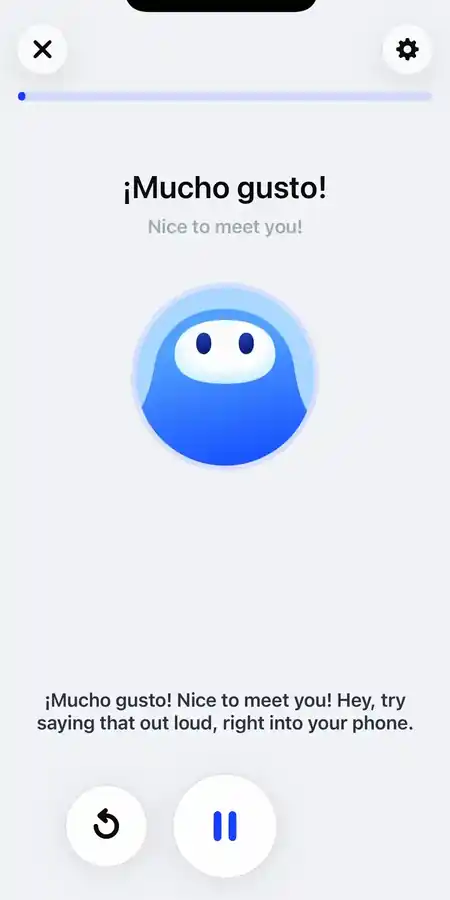
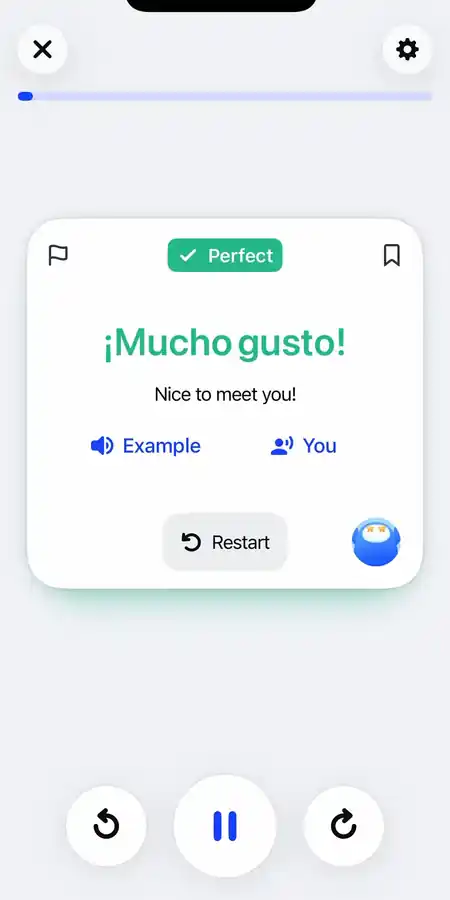
The Tutor Lesson teaches you the phrases you will need later. A virtual tutor with a friendly voice introduces a few related phrases in context. For each one, you see the phrase in the language you are learning, its English translation, and a short explanation of how to use it. After listening to the example, you tap the microphone and repeat the phrase aloud. If your attempt is recognized, the app displays a badge such as “Perfect” or “Good” and lets you compare the reference audio with your own recording.
2. The Speaking Drill
Next comes the Speaking Drill, which Speak describes as using structured repetition to build muscle memory. It works like a set of voice flashcards. The app gives you the phrases you just learned one after another. At first, you see the full phrase on screen. Later, the words are hidden, so you have to remember and say the Spanish phrase after hearing an audio prompt or seeing its English meaning.
3. The Guided Conversation
In the sequence I tested, the final activity was a Guided Conversation set in a café. Virtual characters spoke to me, and the screen suggested what I could say next. I replied out loud, Speak checked my answer, and the conversation continued.
Additional features outside the tested sequence
Speak also includes several features outside the main lesson path:
- Free Talk: A separate conversation area with Immersive Roleplay and a turn-based Chat mode.
- Practice and Smart Review: Speak describes Smart Review as a way to revisit material from your lessons.
- Challenge and Profile: Separate tabs in the version I tested.
What Speak did well in my test
Several parts of Speak worked well for early speaking practice.
Helpful preparation before conversation
An empty conversation screen can be intimidating when you are still a beginner. Speak’s Tutor Lesson reduces that pressure by introducing useful phrases before the Guided Conversation.
In the lesson I tested, Speak gave me the words and context needed for the later café scenario. I found that preparation made the move into roleplay feel more manageable.
Practical cultural context
During my “¡Buenas!” lesson, Speak put me at an airport café in Mexico City. In that scene, the tutor taught “¡Buenas!” as an informal greeting I could use at any time of day.
This kind of explanation tells you more than a flashcard can. You learn not just what a phrase means, but how casual it is and where people actually use it.
Repetition that helps you remember the phrases
The Speaking Drill asks you to say the same phrases several times. First you can see the words; later, you have to remember the phrase from an audio clue. Repeating it also gives you several chances to notice and copy its rhythm.
Side-by-side audio playback comparison
After completing a speaking attempt in the Tutor Lesson, you immediately see two buttons: “Example” and “You”. Tapping Example plays the reference audio, while tapping You replays your own recording. This makes it easy to hear how your pace and tone differ from the example.
What did not work well in my test
I also ran into a few problems that are worth knowing about before you pay for a subscription.
The microphone sometimes missed clear speech
During both the Tutor Lesson and the Speaking Drill, the app occasionally failed to register my attempt. After saying “¡Vamos!”, I had to repeat the phrase before the app advanced. A similar hesitation happened when I said “¡Buenas!”. I thought both first attempts were loud and clear enough.
When an attempt does not register, it interrupts the rhythm of the lesson and leaves you unsure whether to change your pronunciation or simply repeat yourself.
Confusing multi-character Guided Conversations
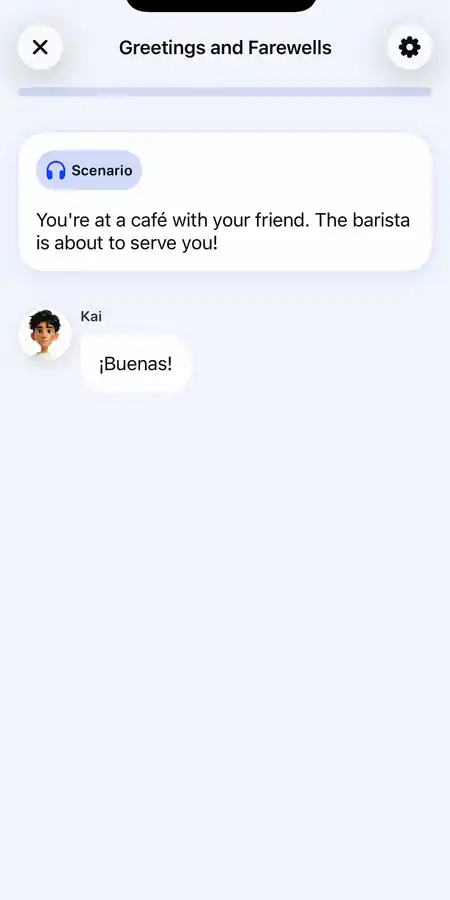
The biggest disappointment in my test was the Guided Conversation. The scenario began with a straightforward setup: you are at a café counter, and the barista is about to take your order. But instead of a focused one-to-one dialogue between the learner and the barista, the app introduced two additional virtual companions named Kai and Noa.
Kai and Noa began chatting with each other and with the barista, turning what should have been a simple ordering practice into a crowded group dialogue. I found it confusing to follow who was speaking, why the characters were talking to each other, and when it was my turn to respond. Later in the scenario, a fourth character named Lumi joined the interaction.
For a beginner who is already nervous about ordering a coffee, four fictional characters are a lot to keep track of. I think the roleplay would have been easier to follow if the conversation had focused directly on me.
That describes the café lesson I tested. Speak also documents a separate Free Talk area with character conversations and a turn-based Chat mode.
Prefer a conversation where your role is obvious? Most Copycat Cafe lessons use two-person dialogues written around everyday situations; some include three or four speakers. Listen to and rebuild the dialogue, practise saying its lines in Copy mode, then use the language in conversation with Copy.
The microphone stayed open and captured the wrong thing
During the Guided Conversation, I paused to comment in English on the buttons on screen. Because the app’s speech input remained active, Speak captured my English voice and tried to transcribe it as Spanish. The result was a long string of nonsensical text. Speak rejected that attempt and showed “Let’s try that again”.
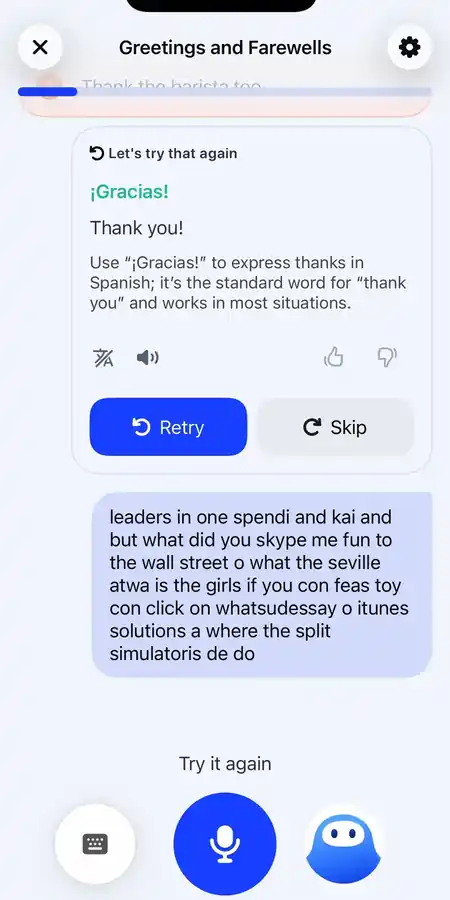
A later nonsensical transcript was accepted
Later in the same conversation, Speak accepted a different response even though the transcript shown on screen was visibly nonsensical, then marked the task complete. This happened once, so I cannot say it is typical. However, the longer Lingtuitive review reports a similar example of Speak accepting an incorrect word, and LanguaTalk’s review says the speech checks can be too forgiving.
Unclear send button behavior
During the conversation, I was not always sure whether Speak would send my reply after a pause or whether I needed to tap the arrow button. That uncertainty led to awkward pauses: I was waiting for Speak, while Speak seemed to be waiting for me. A featured US App Store review describes a similar problem with unclear waiting states and inconsistent tap-to-advance behavior.
Pronunciation and feedback: what learners outside English should know
If you are paying for a speaking app, pronunciation feedback matters. In my Spanish test, I found Speak’s feedback simple. The app displayed badges such as “Perfect”, “Good”, or “Great”, a green check mark, and the Example and You audio replay buttons. I did not see a numerical pronunciation score or a word-level explanation of what to change.
The critical fine print: Pronunciation Coach is English-only
Why does that matter beyond Spanish? Speak’s own Help Center explains it.
In its Help Center article detailing plan differences, Speak says that its Pronunciation Coach is only available to learners studying English.
This distinction matters if you are considering Speak for Spanish, French, Italian, Japanese, Korean, or Chinese. The Help Center does not promise the same Pronunciation Coach for those courses. Other kinds of pronunciation help vary by mode and course: for example, Speak Tutor can answer pronunciation questions. In my Spanish session, I saw simple pass-or-fail feedback and the option to compare recordings. If detailed pronunciation guidance is your top priority, test this closely before subscribing.
Want more than a “Perfect” badge? In Copycat Cafe, Copy mode provides a 0 to 100 pronunciation score and focused feedback when Copy can get a reliable reading from your recording. If it cannot, no score is shown. That feedback can help you decide what to work on next.
Languages available on Speak
English speakers can currently study six target languages on Speak:
- Spanish
- French
- Japanese
- Korean
- Italian
- Simplified Chinese
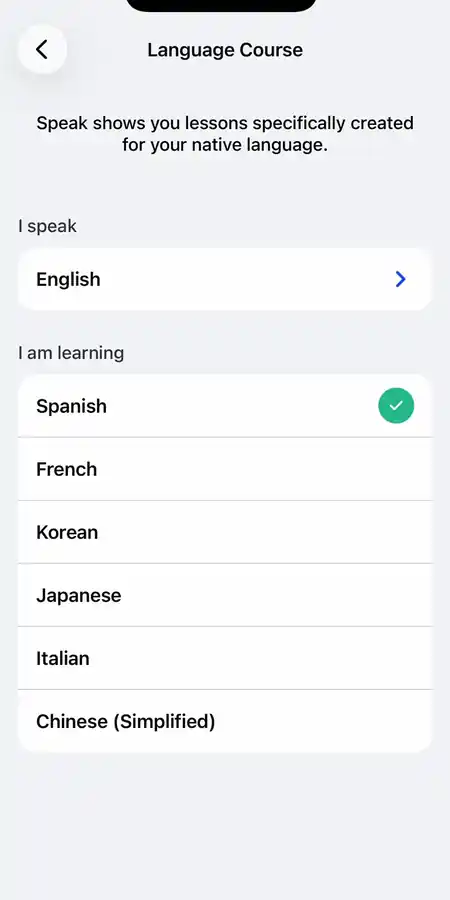
According to Speak’s Help Center, it also offers English courses for learners using 15 native-language settings: Korean, Japanese, Traditional Chinese, Simplified Chinese, Spanish, French, German, Italian, Portuguese, Polish, Vietnamese, Hindi, Thai, Turkish, and Indonesian. To learn English, you select your native language under “I Speak,” and Speak sets the course to English automatically.
Speak app pricing, plans, and the seven-day trial
Speak is a paid subscription app. In the US Apple App Store, it offers two plans, and you can pay for either one monthly or yearly.
Speak subscription prices in the United States
- Speak Premium: $17.99 per month, or $83.99 per year (which works out to approximately $7.00 per month).
- Speak Premium Plus: $39.99 per month, or $164.99 per year (approximately $13.75 per month).
Speak says pricing varies by plan, region, and current promotions, so check the price shown in your app before subscribing.
What is the difference between Premium and Premium Plus?
According to Speak’s Help Center, both plans give you access to the full course, roleplays based on everyday situations, Ask Speak Tutor, and Smart Review.
The main difference is how many personalized lessons you can use:
- Speak Premium: Includes up to three custom “Made for You” lessons per day and limits how many personalized AI Tutor lessons you can use each day.
- Speak Premium Plus: Removes those daily limits and gives you unlimited personalized lessons, a study plan, and extra practice based on the mistakes you make most often.
Premium also includes post-lesson Takeaways based on your mistakes; the dedicated Made for You screen is a Premium Plus feature.
Premium is the sensible plan to try first if you mainly want the standard course and do not expect to use many personalized lessons each day. Premium Plus may be worth it if you keep hitting those limits or specifically want its study plan and extra practice for the mistakes you make most often.
The seven-day trial and the cancellation warning
Speak offers a seven-day free trial so new users can test the app before their first billing date.
There is no permanent free version of Speak. Continued full access after the advertised seven-day trial requires a paid subscription.
Speak vs Copycat Cafe: how the methods compare
Because I co-founded Copycat Cafe, I want to be completely transparent about my perspective and how our learning method differs from Speak’s.
Benjamin and I created Copycat Cafe after noticing the same problem again and again. Many adults understand plenty when they listen or read, but struggle to get those words out in a real conversation. Both Speak and Copycat Cafe tackle this exact problem, but they solve it through different approaches.
| Feature or approach | Speak app | Copycat Cafe |
|---|---|---|
| Learning method | In my tested Spanish sequence: Tutor Lesson → Speaking Drill → Guided Conversation | The Copycat Method: Watch → Copy → Chat built around everyday dialogues |
| Source material | Structured phrase lessons, speaking drills, and roleplay scenes | 200 everyday dialogues written for each course, organized from A1 to B2 |
| Pronunciation feedback | In my Spanish test: basic badges and audio playback. Speak documents its named Pronunciation Coach as English-only | A 0 to 100 pronunciation score in Copy mode with focused feedback for your next take |
| Dialogue turn-taking | The café scenario I tested used several characters and unclear send behavior | Mostly two-person dialogues written around everyday situations; some have three or four speakers |
| AI conversation practice | Guided Conversation in the lesson sequence I tested; separate Free Talk with Immersive Roleplay and turn-based Chat | Chat with Copy, your AI conversation partner, with Normal chat and voice-first Call mode |
| Course options | 6 non-English languages for English speakers, plus English courses with 15 supported native-language settings | 5 courses with 200 dialogues each: French, Spanish (Latin America), Spanish (Spain), Italian, and German |
| Regional Spanish options | Spanish appeared as one learning-language option in my test | Separate dedicated courses for Spanish (Latin America) and Spanish (Spain) |
| Pricing and trial | 7-day free trial offer; Premium listed at $17.99/month or $83.99/year in the US Apple App Store, checked September 23, 2026. Prices and offers may vary | Start copying — 7 days free; paid subscription afterward unless canceled. 30-day money-back guarantee on the first payment |
Speak works well if you want a step-by-step mobile course; in the sequence I tested, speaking drills prepared me for the roleplay. But if you want everyday authored dialogues, clear pronunciation scores with focused feedback, and conversation practice you can enter independently of the lessons, I think Copycat Cafe is the better overall alternative. You start with an everyday dialogue, practise its lines with pronunciation scoring and focused feedback, then use the language with Copy, your AI conversation partner. You can also enter Chat without completing Watch or Copy first.
Want a clearer path from practice to conversation? Practise lines from everyday dialogues, use pronunciation scores and focused feedback to guide your next attempt, then keep talking with Copy.
Pros and cons of Speak
After testing Speak and checking its current pricing and documentation, here are the main pros and cons:
Pros
- Strong speaking focus throughout the core lesson I tested
- Tutor Lessons provide helpful cultural context and clear spoken explanations
- Example and You buttons make it easy to compare Speak’s audio with your own recording
- Step-by-step lessons avoid dropping beginners into an empty AI chat
- Practical everyday topics for travelers and beginners
- Spanish course sections labeled from A1 Beginner to B2 Advanced in the version I tested
Cons
- In my Spanish test, I did not see word- or sound-level pronunciation corrections
- Speak’s Help Center says Pronunciation Coach is only available to English learners
- Several attempts had to be repeated before the app advanced in my test
- The multi-character café Guided Conversation felt confusing in my test
- A later turn with a visibly nonsensical transcript was accepted as complete in my test
- No permanent free version, and Speak says you must cancel at least 24 hours before the trial ends
Who Speak is best for (and who should skip it)
No language app is right for everyone. Whether Speak fits your routine depends on how you like to learn, your current level, and your budget.
Speak is a great fit if you:
- Freeze when trying to speak: If you know basic grammar but struggle to get words out of your mouth, Speak gives you repeated, low-pressure speaking practice.
- Want structured mobile study: If you enjoy opening an app on your phone and following a clear, step-by-step course, Speak is well organized.
- Are preparing for travel: The introductory units start with everyday situations such as ordering food, asking for directions, and greeting people.
- Dislike open-ended chatbots: If unguided AI tutors overwhelm you, Speak gives you useful phrases before asking you to respond.
You should look for an alternative if you:
- Need more detailed pronunciation feedback than I saw in Spanish: Speak’s Help Center limits its named Pronunciation Coach to English learners, so test the feedback available in your target language before paying.
- Want a completely free tool: Continued full access after Speak’s advertised seven-day trial requires a paid subscription. If your budget is zero, free Duolingo or free podcasts are better starting points.
- Dislike scripted repetition: If repeating the same sentence several times feels tedious rather than helpful, Speak’s drill format may frustrate you.
To explore how other tools compare, take a look at our guide to the best AI language learning apps and our roundup of the best apps to learn Spanish.
Final verdict: how to make the most of your trial
Speak’s Tutor Lesson makes a strong first impression. It gives beginners context and repetition before asking them to roleplay. The Spanish pronunciation feedback I saw was basic, and I found the multi-character conversation confusing, but the lesson flow kept spoken practice visible throughout my test.
If you decide to try Speak, use this checklist to get the most from the seven-day trial and avoid an unwanted charge:
- Set a calendar reminder for Day 5: Speak says you must cancel at least 24 hours before the trial ends. A reminder on day five gives you time to decide before you are charged.
- Test the microphone in your normal study environment: Try the app where you would actually use it. Check whether it catches your first attempt reliably and whether background sound affects the transcript.
- Complete the full lesson sequence more than once: Try the Tutor Lesson, Speaking Drill, and Guided Conversation several times. See whether you still enjoy the repetition after a few days.
- Test the Free Talk tab: Talk freely for ten minutes. Check whether the AI tutor understands how you normally speak and whether its corrections actually help.
- Decide whether the feedback is useful enough: Pay close attention to the feedback screens. If simple “Perfect” or “Good” badges and playback are enough, Speak Premium may suit you. If you want a numerical pronunciation score and a clearer next step, compare Copycat Cafe or a dedicated pronunciation tool before committing to an annual plan.
Speak is a reasonable choice if its guided drills and simple feedback keep you talking. If the lack of the named Pronunciation Coach in your target language or the crowded café roleplay I tested feels like the wrong compromise, consider Copycat Cafe. It also keeps you speaking, but gives you a clearer Watch → Copy → Chat path.
Ready for clearer feedback and simpler conversations? Copy lines from everyday dialogues, use pronunciation scores and focused feedback to guide your next attempt, then keep talking with Copy, your AI conversation partner.
Frequently asked questions about Speak
How much does the Speak app cost?
In the United States Apple App Store, Speak Premium costs $17.99 per month or $83.99 billed annually (equivalent to roughly $7.00 per month). Speak Premium Plus costs $39.99 per month or $164.99 billed annually (roughly $13.75 per month). Speak advertises a seven-day trial of the selected plan; check the offer shown at signup.
Does Speak have a free version?
No. Speak does not offer a permanent free plan. The app is free to download. Speak offers a seven-day trial of the selected paid plan with payment details required. The selected subscription renews automatically unless you cancel at least 24 hours before the trial ends.
Is Speak worth the money?
Speak is worth testing for adult beginners who want structured speaking practice on mobile and freeze when faced with open-ended conversation. I would compare alternatives if detailed pronunciation feedback is your priority: the feedback I saw in Spanish was basic, and Speak currently documents its named Pronunciation Coach as English-only.
What languages can English speakers learn on Speak?
English speakers can currently learn six languages on Speak: Spanish, French, Japanese, Korean, Italian, and Simplified Chinese. To access these courses, your native language setting inside the app must be English.
Does Speak correct Spanish pronunciation?
In my Spanish test, Speak provided basic feedback: a green check mark, completion badges (“Perfect”, “Good”, “Great”), and side-by-side audio playback comparison. Speak’s official Help Center confirms that its detailed Pronunciation Coach is available only for learners studying English.
What is the difference between Speak Premium and Premium Plus?
Speak Premium includes the full course, conversation roleplays, and review features, but limits Made for You lessons to three per day and also limits personalized Tutor lessons. Premium Plus removes those limits, offering unlimited personalized lessons, custom study plans, and focused practice on frequent mistakes.
Is Speak better than Duolingo?
Speak may suit you better if you mainly want to practise speaking aloud, because speaking was central to every stage of the lesson sequence I tested. Duolingo may suit you better if you want a free option, more languages, or casual reading and vocabulary practice. Our Duolingo Max review looks more closely at its paid speaking features.
How do you cancel the Speak free trial?
Cancel through the platform where you started the subscription. Apple purchases are canceled in Apple Subscriptions, and Google Play purchases are canceled in Google Play Subscriptions. If you subscribed through Speak’s website, open the app and go to Profile → Settings → Manage Membership → Cancel Membership, then tap Cancel Subscription to confirm. Speak says you must cancel at least one day before the trial ends to avoid the first charge.