

Disclosure: This article contains affiliate links. If you sign up through them, we may earn a commission at no extra cost to you.
You have narrowed it down to two of the oldest names in language learning, Pimsleur and Rosetta Stone, and they could hardly teach more differently. A Pimsleur lesson is half an hour of audio that keeps stopping so you can answer out loud. A Rosetta Stone lesson shows you photos and short phrases in the new language and lets you work out what they mean, with no English on the screen.
So the real question is how you learn best: by ear or by eye. This comparison shows how each one teaches, what happens when you get something wrong, how much you speak, how each one sounds, what you can try for free and what each costs today.
Prices checked November 13, 2026.
How we tested
I used Rosetta Stone’s French course in its Classic app for our Rosetta Stone review, judging it as a native French speaker. On November 13, 2026, our team took the free French lesson of Rosetta Stone Sapphire, the app new customers get today, on its website: we picked wrong pictures on purpose, fed its speech check computer-generated French lines and checked its audio. Alysa Salzberg, on our team, used Pimsleur’s French course in its Audio-Only and Premium versions on her computer and phone for our Pimsleur review. From November 11 to 13, 2026, our team took Lesson 1 of Pimsleur’s French, Latin American Spanish, Italian and German courses on the web, and answered wrong on purpose in the French, Spanish and Italian practice games. We checked both companies’ US prices on November 13.
How do Pimsleur and Rosetta Stone teach?
Pimsleur teaches by ear, and Rosetta Stone teaches through pictures. Both leave grammar mostly to the examples instead of explaining rules.
A Pimsleur lesson is about 30 minutes of audio. An English narrator plays a short conversation, breaks it into pieces and asks you to say each one before a native speaker gives the answer. New words are built up from the end, so in French Lesson 1 you hear “moi”, “cusez”, then “excusez-moi”, and in Latin American Spanish “pe… culpe… Disculpe”. Much of the lesson is silence left for you to fill. We counted 22 answer pauses in the first two and a half minutes of French Lesson 1, about a third of the time, and 31 pauses, 79 seconds in all, in the first three minutes of Latin American Spanish Lesson 1. In Italian Lesson 1, which we covered in our guide to the best Italian apps, 25 pauses took up 34% of the first three minutes.
Rosetta Stone has no narrator and no English. In the free lesson of its French course, Sapphire showed us two labelled photos, une fille and un garçon, then asked us to find une fille among new photos. Short sentences followed, such as Le garçon mange. and Le garçon boit., matched to photos of a boy eating and a boy drinking. The lesson's first spoken step asked us to say Bonjour ! When I used the Classic French course, it worked the same way: pictures for la femme and le garçon, and grammar picked up from examples. I found the early levels tedious, with no efficient way to skip ahead.
For getting from hearing a line to saying it yourself, Copycat Cafe gives you more control than either: each lesson’s conversation plays at normal or slow speed with the written lines, and you can slow any single line down and rebuild it word by word by ear before you say it.
The choice also depends on where you will study. Pimsleur works with your eyes and hands busy, in the car or on a walk, as long as you have half an hour. Rosetta Stone needs a screen, but it gives you something to look at, which helps if words only stick once you have seen them.
What happens when you get an answer wrong?
Neither app tells you why you were wrong. Pimsleur marks the mistake, and its Quick Match game also shows the right answer, while Rosetta Stone plays a sound and lets you try again.
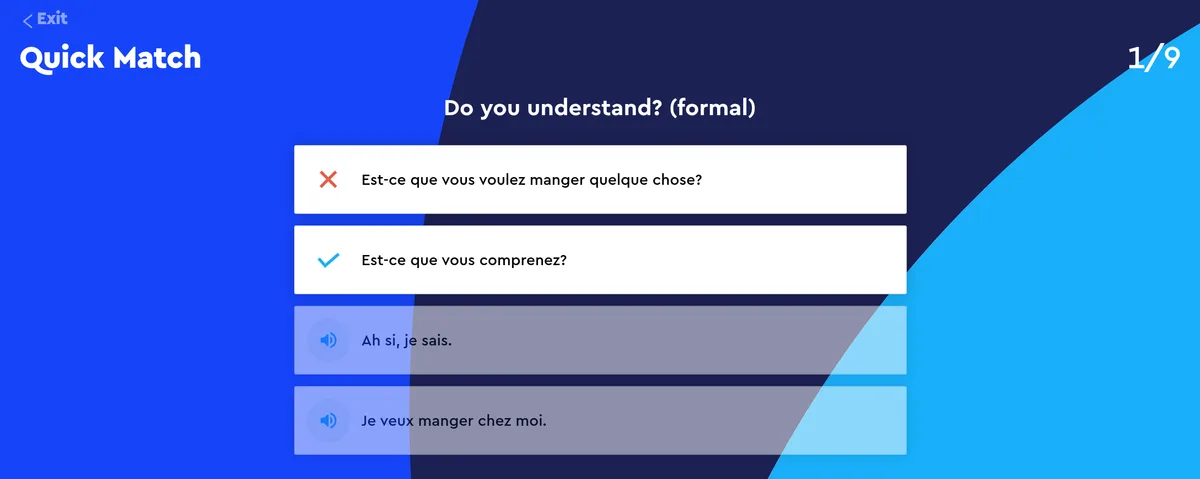
Pimsleur’s audio lesson can’t hear you, so its corrections happen in the practice games that come with each lesson. In French Quick Match, we answered “Do you understand? (formal)” with Est-ce que vous voulez manger quelque chose ? on purpose. Pimsleur put a red X on our answer and a check on Est-ce que vous comprenez ?, played an error sound and moved on. The question came back at the end of the round, but nothing explained the mistake. Quick Match in the Latin American Spanish and Italian courses did the same: a red cross and no explanation. In Speed Round, our wrong tile turned red in French, with an error sound, and pink in Spanish, with no text either time.
Rosetta Stone says even less. In its French lesson on the web, we picked the photo of a boy for une fille, three times. Each time the page played a short “wrong” sound and put a faint border around our pick. Nothing else changed on screen, and the question stayed open until we chose the girl. Picking the boy who was drinking for Le garçon mange. got the same sound and nothing more. That fits a method with no English to explain things in, but if the sound alone doesn’t tell you what went wrong, you are left guessing.
Which is better for speaking?
Pimsleur makes you speak more often, and Rosetta Stone is the one that listens during its lessons. In our tests, neither told us much about how we sounded.
Pimsleur has you answering out loud dozens of times in each lesson, but the lesson is a recording, so it can’t tell whether you got it right. Its Speak Easy activity shows the lesson’s conversation in writing and plays each line at half, three-quarter or full speed for you to repeat. When we used it in the French course, it never asked for our microphone. When Alysa used Pimsleur’s French course, neither the web app nor the mobile app could access her microphone.
Pimsleur’s speech feedback lives in Voice Coach, part of Premium and All Access. Pimsleur’s Voice Coach guide says it rates you Fair, Good or Excellent in Practice mode and gives a 1–100 score in Challenge mode that combines remembering the phrase and pronouncing it. Its App Store listing adds a Conversation Coach, with feedback on grammar and pronunciation, for All Access learners of Japanese, Latin American Spanish and French.
Rosetta Stone builds speaking into the lesson. Before the first spoken step of its French web lesson, Sapphire asked us to pick a voice type (Male, Female or Child) and turn on the microphone, then listened in the browser. A generated “Bonjour !” passed, and silence didn’t. Then, when the lesson asked for “Bonjour !”, we gave it a generated “Au revoir !”, and it was accepted: the same success sound, the line turned blue and the lesson moved on. A generated “Merci beaucoup !” was rejected with the wrong-answer sound, without a score or an explanation. That was one try of each, with generated speech rather than a learner’s voice, so it is a single example rather than a measure of how accurate the check is.
When I used TruAccent, Rosetta Stone’s speech check, in the Classic French course, it gave me a pass or fail rather than a score, and a sensitivity setting let me make it stricter or more forgiving. Rosetta Stone’s conversation practice, Chat Missions, is typed: its help centre describes text-based conversations with a virtual partner.
For pronunciation feedback, Copycat Cafe goes further than both. You say each line aloud and get a 0–100 pronunciation score on every word, with a tip on what to change in the words that need work, then use the same language out loud with Copy, your AI conversation partner.
Which one sounds more like real speech?
Pimsleur, in our tests. Lesson 1 of its French, Latin American Spanish and Italian courses sounded like recordings of native speakers, while the Sapphire French clips we checked sounded synthetic to our audio check.
In Pimsleur’s French Lesson 1, the speakers had a standard accent from France. The pace was a little slower than everyday speech, but the intonation sounded natural, and they linked words the way French speakers do. The Latin American Spanish voices sounded like recorded native speakers to us, and the Italian ones like native speakers of standard Italian in clear studio recordings. The narrator and the Quick Match questions are in English, and Alysa found that the French phrases leaned formal.
We checked ten short clips from Rosetta Stone’s French web lesson, from Bonjour ! to Le garçon boit. They were clear, with a standard France French accent, but to our audio check they sounded like text-to-speech rather than recordings of people. In the Classic French course I used, the dialogues had native speakers, but they spoke much more slowly and formally than anyone you will meet in real life.
Can you try Pimsleur and Rosetta Stone for free?
Yes. Pimsleur gives you Lesson 1 of each course and a 7-day trial. Rosetta Stone has free practice on its website, capped each day, and a 7-day trial in its app.
In Pimsleur’s web library, French Lesson 1 was marked “Free lesson”, Lessons 2 to 30 were locked, and the free account also opened Lesson 1’s practice games. Pimsleur’s free lesson is offered in 51 languages, according to its App Store listing. After that, new customers can try a subscription free for 7 days.
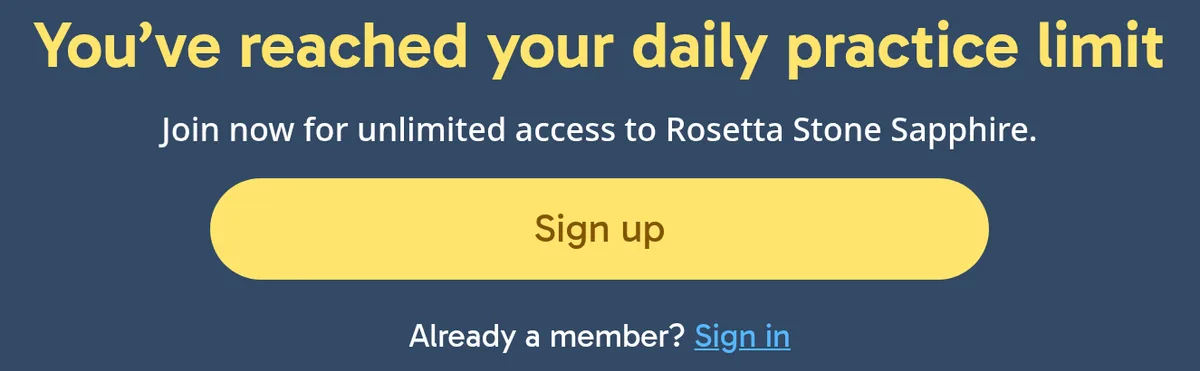
Rosetta Stone’s free practice opened its French lesson without an account. After about two minutes, it stopped with “You’ve reached your daily practice limit”, about 59% of the way through the first lesson, and its “Sign up” button led to the paid plans. A second, fresh browser session stopped at the same point.
Rosetta Stone’s help centre says the one-time 7-day free trial starts in the Sapphire app on your phone and turns into a paid monthly plan when it ends. It also says a free account in the app unlocks the first lesson in every language.
How much do Pimsleur and Rosetta Stone cost?
A year costs almost the same: $164.95 for Pimsleur All Access and $159 for Rosetta Stone, each covering every language it teaches. The real differences are lifetime access, which only Pimsleur sells today, and the refund terms.
Here are the prices on Pimsleur’s Latin American Spanish page, its lifetime page and Rosetta Stone’s plans page.
| Plan | Pimsleur | Rosetta Stone |
|---|---|---|
| Monthly | $19.95 for Premium (one language), or $20.95 for All Access (50+ languages) | $19.99, all 25 languages |
| Yearly | $164.95 for All Access ($13.75 a month) | $159 ($13.25 a month) |
| Lifetime | $112.50 for Latin American Spanish Level 1, $431.25 for all five levels, $478.80 for All Access Lifetime (sale prices) | Not sold |
| Try it free | Lesson 1 of each course, then a 7-day trial | Daily-limited practice on the website, then a 7-day trial in the app |
| Money-back guarantee | 30 days on qualifying direct purchases, excluding plans that start with a free trial | 14 days on website purchases |
Pimsleur’s monthly Premium plan covers one language, and All Access costs $1 more for all of them. The lifetime prices were sale prices: $150, $575 and $798 were struck through. At $478.80, All Access Lifetime costs about as much as three years of All Access Annual. Rosetta Stone sells one plan, billed monthly or yearly, plus tax, with every language included.
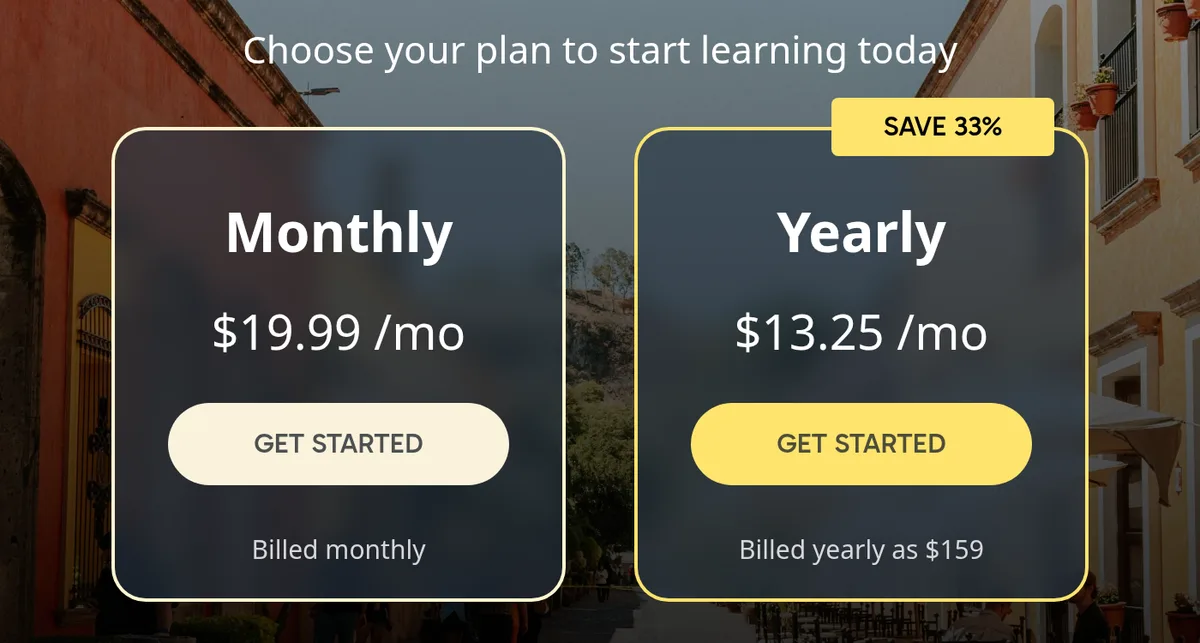
Rosetta Stone sold Lifetime for $149 on past Black Fridays, but on November 13 its plans page offered only monthly and yearly billing, and its old lifetime address redirected there. Rosetta Stone’s help centre says people who already own Lifetime keep access to what they bought for as long as it is “available and supported”.
The refund terms differ too. Rosetta Stone’s checkout promises a 14-day money-back guarantee on purchases made on its website, and its help centre gives the same 14 days for subscriptions bought directly from Rosetta Stone. Pimsleur’s lifetime purchases list a 30-day guarantee, but its guarantee page excludes anything that starts with a free trial of 7 days or longer, along with purchases through Apple or Google, so use the Pimsleur trial to decide. Our Pimsleur price guide and Rosetta Stone price guide cover every plan, and our Black Friday guides for Pimsleur and Rosetta Stone track this year’s deals.
Pimsleur or Rosetta Stone: which should you choose?
Pick the one that matches how you learn and where you will practise.
- You learn by ear or study on the move: Pimsleur. Its 30-minute lessons need no screen and have you answering out loud from the first minutes.
- You need to see things to remember them: Rosetta Stone. Photos and written phrases carry every lesson, all in the new language.
- You want several languages for one price: either. Rosetta Stone’s $159 year covers 25 languages, and Pimsleur’s $164.95 year covers more than 50.
- You want to pay once: Pimsleur, the only one of the two selling lifetime access today.
- You want to know why an answer was wrong: neither. In our tests, both marked mistakes without explaining them.
If grammar explained in English matters to you, our Pimsleur vs Babbel and Babbel vs Rosetta Stone comparisons cover an app built around it. If you are also weighing a free app, read Pimsleur vs Duolingo and Rosetta Stone vs Duolingo. Our Pimsleur Spanish review goes deeper into that course.
What if speaking is your main goal?
Then look past both. Pimsleur makes you talk, but its audio lessons can’t hear you, and in our one try with generated speech, Rosetta Stone’s speech check accepted “Au revoir !” for “Bonjour !”. For speaking, our pick is Copycat Cafe: you hear an everyday conversation, say each line aloud with a 0–100 pronunciation score on every word, then use it with Copy, your AI conversation partner. It teaches French, Spanish, Italian and German, and costs $29 a month or $174 a year in the US, with a 7-day free trial and a 30-day money-back guarantee on your first payment.